
Introduction
You send a free product to an influencer. You pay for shipping. You wait two weeks. And then? Radio silence. They ghost you. Or worse, they post a video that looks terrible. The “begging for reviews” era is over. Smart e-commerce brands are pivoting to AI UGC (User Generated Content).
In this guide, I’m going to show you how to use tools like ChatGPT and CapCut to generate high-converting, “faceless” video ads. The best part? You don’t need a camera, you don’t need to show your face, and it costs $0.
The Influencer Marketing Crisis: Why the “Begging” Era is Over
The Diminishing Returns of Human Dependency
For the past decade, the standard operating procedure for scaling a Direct-to-Consumer (DTC) brand involved a predictable but increasingly inefficient cycle: identifying influencers, negotiating rates, shipping free products, and hoping for a return on investment (ROI). However, comprehensive market data now indicates that this model is facing a crisis of diminishing returns, strained by saturation, fraud, and escalating costs.
The Economics of Friction
The logistical friction inherent in human-centric UGC is significant and often underestimated. Traditional campaigns require extensive lead times. Brands must account for shipping logistics, the creator’s personal production schedule, and the inevitable back-and-forth regarding creative direction. Statistics indicate that producing high quality traditional UGC can cost between $350 and $800 per video, with delivery times stretching to 2-3 weeks.
This timeline is antithetical to the needs of modern dropshipping, where speed to market is the primary competitive advantage. Testing a viral product requires immediate feedback loops. Waiting 21 days for a video asset to test a product trend that may only last 30 days is a strategic failure. Furthermore, the creator response rate is notoriously low, averaging roughly 12%. This necessitates a massive outreach volume contacting nearly ten influencers to secure a single partnership—which transforms marketing teams into glorified call centers.
The Hidden Costs of Non Compliance and Fraud
Beyond the direct financial costs, the operational overhead is immense. Brands report a 34% non-compliance rate where creators fail to adhere to the creative brief, necessitating revisions that further delay the campaign. More alarmingly, the reliability of the influencer market is under severe scrutiny. In 2023, nearly 60% of brands reported experiencing influencer fraud, including fake followers and inflated engagement metrics.
This creates a hazardous environment for advertisers where budget is expended on audiences that effectively do not exist. Additionally, the “ghosting” phenomenon where influencers receive free products but cease communication—remains a prevalent issue. This transforms marketing budgets into charitable donations with zero commercial return. The opportunity cost of inventory lost to ghosting influencers, combined with shipping fees, creates a “silent tax” on the traditional marketing model that AI UGC completely eliminates.
The Rise of AI UGC: A Deterministic Alternative
In stark contrast, AI UGC represents a shift toward automation, precision, and scalability. AI UGC is defined as content that utilizes artificial intelligence to generate voiceovers, visuals, scripts, and even avatars that mimic the aesthetic and authenticity of user generated content without requiring a physical recording session.
The Volume Game: Why Quantity Wins
The core “Magnet” effect is achieved through consistency. Algorithms on platforms like TikTok, Instagram Reels, and YouTube Shorts prioritize account activity and retention. AI tools allow for the creation of 10 videos in the time it takes a human creator to film one often in under an hour. This “volume velocity” signals relevance to the algorithm, exponentially increasing the probability of viral distribution.
The Economic Disruption
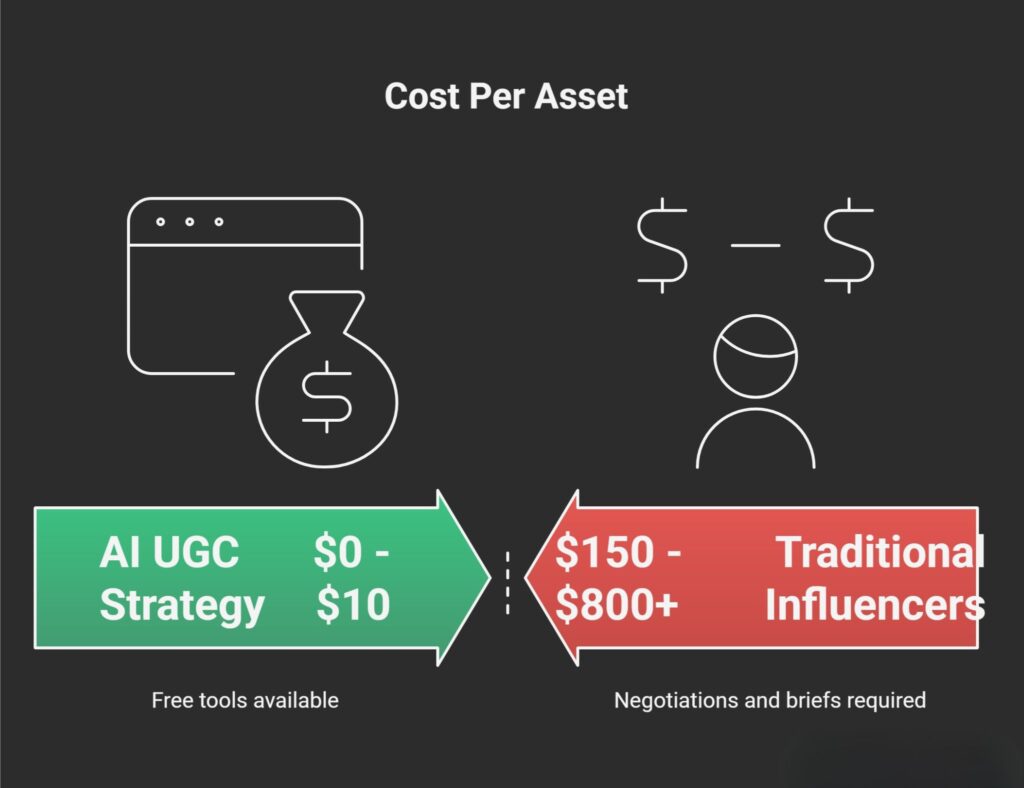
The financial implications of shifting to AI UGC are profound. Data suggests a potential cost reduction of up to 96% compared to traditional methods. Where a human generated video might cost $200 and take two weeks, an AI generated equivalent can be produced for under $10 (often $0 with free tools) in a matter of minutes.
Table 1: The Efficiency Gap – Influencer Marketing vs. AI UGC
| Feature | Traditional Influencers | AI UGC Strategy (Winner) |
|---|---|---|
| Cost Per Asset | $150 – $800+ | $0 – $10 (Free Tools) |
| Time to Live | 14 – 21 Days | 20 – 60 Minutes |
| Headache Factor | High (Negotiations, Briefs) | Zero (Total Creative Control) |
| Scalability | Linear (1 video = 1 effort) | Exponential (Software) |
| Brand Compliance | ~66% (Revisions often needed) | 100% (Frame-by-frame editing) |
The strategic advantage here is not merely cost savings; it is the ability to A/B test aggressively. A brand using AI can generate 50 variations of a hook, script, or visual style for the price of one influencer post. This granular testing allows for rapid optimization of Return on Ad Spend (ROAS), a capability previously reserved for enterprise level advertisers with massive creative teams.
What is “AI UGC” and Why Does It Work?
Deconstructing the “UGC” Aesthetic
To understand why AI UGC is effective, one must first analyze the psychology of traditional UGC. User Generated Content works because it acts as social proof. Consumers trust “peers” more than brands; 92% of consumers trust word of mouth and UGC over traditional advertising. The aesthetic of UGC—shaky camera work, natural lighting, unpolished audio, and colloquial language signals authenticity to the viewer. It bypasses the “ad blindness” that consumers have developed toward polished, high production commercials.
Traditional UGC relies on a human face to establish this trust. However, the emerging “Faceless” economy proves that the voice and the narrative are equally potent drivers of trust.
The Simulation of Authenticity
AI UGC works by simulating these specific aesthetic markers of authenticity. It is not about creating a perfect, cinematic video; it is about creating a video that feels like it was made by a real person on their phone.
- Visual Mimicry: AI tools now utilize “faceless” strategies where the product is the protagonist. By using high quality B roll or product footage (sourced legitimately) and overlaying it with dynamic captions and voiceovers, the content retains the “peer review” feel without needing a human face.
- Auditory Mimicry: The “Secret Sauce” of AI UGC is the voice. Advanced Text-to-Speech (TTS) engines like ElevenLabs and CapCut’s internal tools offer voices that include breath pauses, tonal inflections, and “Gen Z” speaking styles. These voices are often sped up by 1.1x or 1.2x to match the fast-paced, energetic cadence of TikTok creators, creating an auditory illusion of a real human enthusiast.
The “Faceless” Strategy: Addressing Skepticism
A common objection is that AI content lacks the “human connection.” “Won’t it look fake?” is the primary concern. However, data indicates that “faceless” channels are among the most profitable and fastest-growing segments on YouTube and TikTok. The strategy relies on Faceless Marketing, where the narrative focus shifts from the person to the problem and the solution.
The skepticism regarding “fake” content is mitigated by the editing technique. By mixing AI-generated voiceovers with real product close-ups, unboxing clips, and demonstration footage, the viewer’s brain registers the physical reality of the product. The AI voice merely serves as the narrator. As long as the visual evidence of the product’s function is authentic, the artificial nature of the narrator is often overlooked or accepted by the audience.
Furthermore, hybrid approaches involving AI avatars (from tools like HeyGen) allow brands to insert a “human” element for the hook (the first 3 seconds) before cutting to product footage. This technique anchors the video in humanity while leveraging the efficiency of AI for the bulk of the content.
The $0 Workflow: How to Create Your First AI Ad
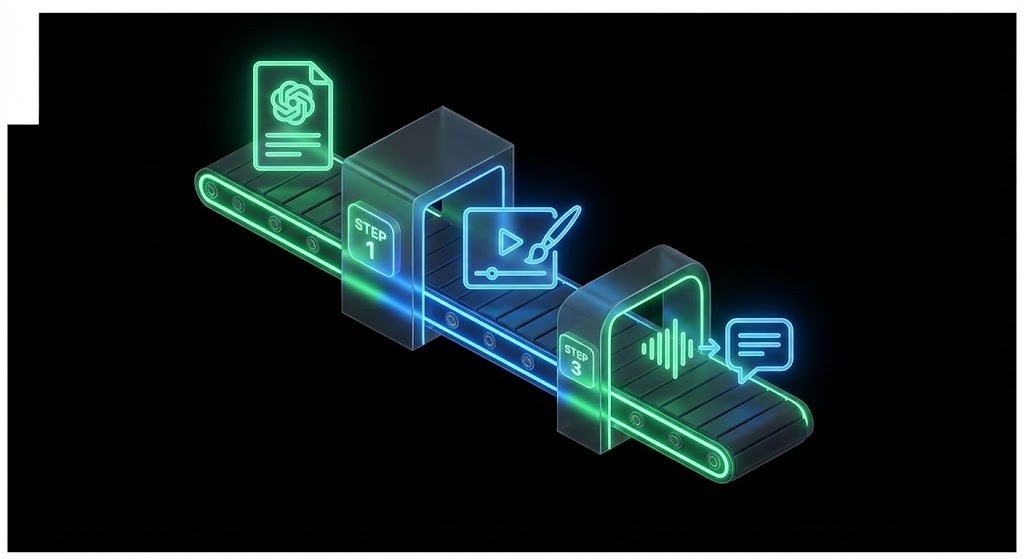
This section serves as the core operational tutorial of the report. It outlines a granular, step-by-step workflow for executing the “Traffic Magnet” strategy using a zero dollar tech stack. This workflow is designed to be executed by a single individual with no prior video editing experience.
Step 1: The Script (ChatGPT & Prompt Engineering)
The foundation of a high converting video is not the visual; it is the script. Specifically, the “Hook.” In the scroll economy, you have less than three seconds to stop the thumb. A weak script with great visuals will fail; a great script with mediocre visuals can still go viral.
The Psychological Framework of a Viral Script
Viral scripts typically follow a modular structure optimized for retention:
- The Hook (0-3 Seconds): A pattern interrupt or a bold claim.
- The Problem/Agitation (3-10 Seconds): Validating the viewer’s pain point.
- The Solution/Product (10-20 Seconds): Introducing the product as the only viable mechanism for relief.
- Social Proof/Features (20-25 Seconds): Rapid-fire benefits.
- The Call to Action (CTA) (25-30 Seconds): Direct instruction on what to do next.
The “Traffic Magnet” Prompt Box
To generate scripts that adhere to this framework, one must use advanced prompting techniques with Large Language Models (LLMs) like ChatGPT. The following prompt is engineered to bypass generic AI writing and produce platform-native content.
Advanced Hook Strategies
Research identifies several high-converting hook archetypes that should be rotated in testing. Utilizing varied hooks prevents ad fatigue and captures different segments of the audience.
Table 2: High-Converting Hook Archetypes
| Hook Type | Example Script | Psychological Trigger |
|---|---|---|
| The Negative Hook | “Stop buying expensive creams…” or “Don’t hate me, but…” |
Uses Negativity Bias; people are wired to avoid mistakes. |
| The Future-Pacing Hook | “Imagine achieving clear skin without [Pain Point]…” | Visualization of success; appeals directly to desire. |
| The Skepticism Hook | “I didn’t think this $5 tool would work, but…” | Validates user doubts, building instant rapport. |
| The Call-Out Hook | “If you have a [Dog/Cat], you need to see this.” | Identifies the “Tribe”; ensures only qualified leads watch. |
| The “Silent Review” | (Visual Only: Expressive facial reactions using avatars) | Intrigue; forces the viewer to watch to understand context. |
Step 2: The Visuals (Sourcing & Compliance)
The visual component of the “Faceless” strategy relies on sourcing footage without physically possessing the product initially. This allows for rapid testing without inventory risk.
Sourcing Footage Legitimately
While many dropshippers scrape content from AliExpress or TikTok, this carries copyright risks. The “Traffic Magnet” approach prioritizes longevity and safety.
- AliExpress/Supplier Footage: Suppliers often provide video assets. However, legally, one cannot simply take them. The protocol is to ask.
- Supplier Permission Protocol: Using a templated email to secure rights is a professional necessity that separates sustainable businesses from “churn and burn” stores.
I am a retailer interested in heavily promoting your [Product Name] on my TikTok store. We are planning a marketing push that could drive significant volume.
Do you grant us permission to use the video footage from your product listing for our advertising campaigns? We can also share our creative assets with you in return.
Best,
[Your Name]
- Stock Footage & B-Roll: For the “Problem” section of the script (e.g., someone looking stressed, a messy room), use royalty-free stock footage. Platforms like Canva and Pexels provide high-quality vertical video assets that serve as excellent filler between product shots.
Visual Construction in Canva
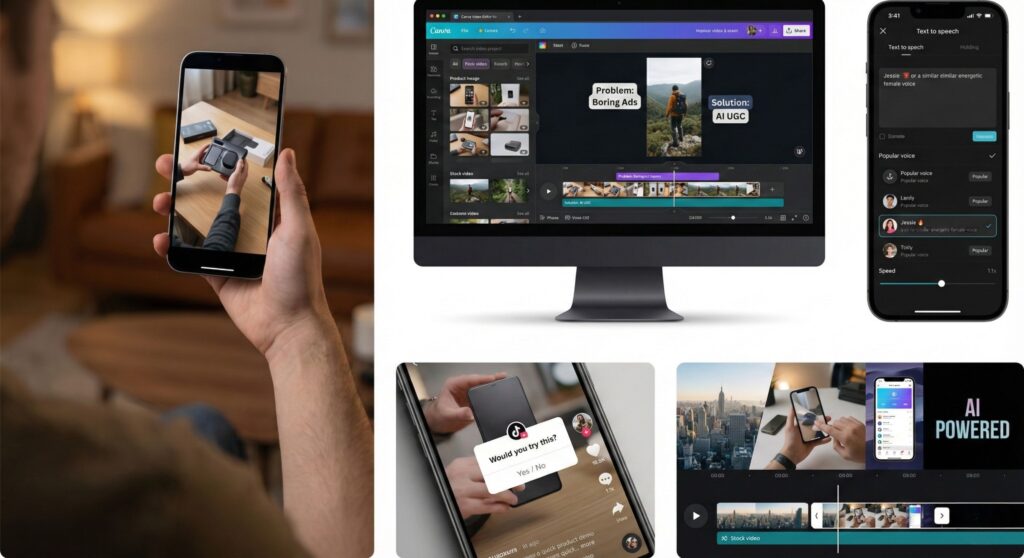
Canva has evolved into a robust video editor suitable for constructing the visual “skeleton” of your ad.
- Search: Use keywords like “Vertical Video” or “TikTok” in Canva to find templates.
- Layout: Create a 1080×1920 canvas.
- Montage: Upload the supplier footage and stock clips. Arrange them to match the pacing of the script generated in Step 1.
- Text Overlay: This is crucial for “silent viewing.” Use bold, high contrast fonts (e.g., “The Fancy One” or “The Eccentric” styles mentioned in CapCut resources) to highlight key words from the script.
Step 3: The AI Voice/Avatar (The “Secret Sauce”)
The audio quality determines the retention rate. A robotic voice kills engagement; a hyper realistic AI voice boosts it.
Tool Selection: CapCut vs. ElevenLabs
- CapCut (The Free Workhorse): CapCut offers a completely free, integrated text-to-speech function with “TikTok native” voices (like the popular “Jessie” or energetic male narrators). This is the best starting point for the $0 workflow.
- Pro Tip: To make the voice sound more authentic, increase the speed to 1.1x. This mimics the fast-talking cadence of content creators trying to squeeze information into a Short.
- ElevenLabs (The Premium Standard): For a more distinct brand voice, ElevenLabs offers superior emotional range and “voice cloning.” While it has a free tier, commercial rights usually require a starter subscription. For the strict $0 budget, rely on CapCut.
The “Faceless” Illusion with Avatars
For brands wanting a “person” without hiring one, tools like HeyGen allow for the creation of AI avatars.
- Workflow: Upload the script -> Select an avatar -> Export video.
- Limitations: The free tiers of avatar generators often include watermarks.
- Strategy: If using a free avatar tool, use the avatar only for the “Hook” (first 3 seconds) and the “CTA” (last 3 seconds). Crop the video or use stickers/text overlays to obscure watermarks if ethically/legally permissible, or simply use the avatar clip as a “Picture-in-Picture” overlay to minimize the intrusion.
Step 4: Editing & Production (CapCut)
CapCut is the industry standard for short form video editing due to its native integration with TikTok’s trends. It serves as the assembly line where script, visuals, and voice converge.
The Editing Workflow
- Import: Bring the visual sequence (from Canva) and the AI Voiceover (from CapCut TTS) into the timeline.
- Sync: Adjust the clip lengths to match the voiceover beats. Rapid cuts (every 2-4 seconds) are essential for retention.
- Auto-Captions: Use CapCut’s “Auto Caption” feature. This is non-negotiable. 40% of users watch with sound off, but even those with sound on read along. Style the captions to be “Karaoke style” where the current word highlights in color.19
- Effects: Apply the “Freeze Frame Clone” effect for visual flair if the footage allows.20 This involves freezing a frame of the product or person and having the “live” version interact with it, a trending editing style that boosts watch time.
- Music: Add a trending audio track.
- Critical Warning: For commercial ads (Spark Ads, Facebook Ads), you cannot use copyrighted pop music. You must use the “Commercial Music Library” within TikTok or royalty-free tracks from CapCut’s commercial library to avoid lawsuits and ad rejection.21

Top 3 AI Tools for UGC: A Comparative Analysis
To execute this strategy effectively, selecting the right toolset is paramount. Below is an analysis of the top three contenders, evaluated based on their utility for the “Traffic Magnet” strategy.
1. CapCut (The All-in-One Powerhouse)
- Best For: The complete $0 workflow (Editing, Voice, Captions, FX).
- Pros: Completely free for core features; access to “viral” voiceovers; commercial music library included; superior auto-captioning templates.4
- Cons: Desktop version can be resource-intensive; commercial rights on some templates are vague.
- Verdict: The essential tool for any dropshipper or marketer starting out. It covers 90% of the workflow requirements for $0.
2. ElevenLabs (The Voice of Quality)
- Best For: Hyper-realistic audio that passes the “human test.”
- Pros: Unmatched voice quality; ability to clone your own voice to create a consistent “brand character” without recording every script.17
- Cons: Free tier does not include commercial rights (requires attribution and forbids commercial use).23 Paid plan required for ads.
- Verdict: The upgrade step once the store generates revenue.
3. HeyGen (The Visual Humanizer)
- Best For: Creating “Talking Head” videos without a camera.
- Pros: Solves the “faceless” trust issue by providing a face; high lip sync accuracy.1
- Cons: Restrictive free tier (watermarks, limited duration).18 Expensive for high volume.
- Verdict: Use sparingly for specific “Founder Stories” or “Customer Support” style videos, but rely on B-roll for high-volume creative testing.
Table 3: Tool Feature Matrix for AI UGC
| Feature | CapCut | ElevenLabs | HeyGen |
|---|---|---|---|
| Primary Function | Video Editing / TTS | AI Voice Generation | AI Avatar Generation |
| Free Commercial Use? | Yes (mostly) | No (Restricted) | No (Watermarked) |
| Auto-Captions | Excellent (Viral Styles) | N/A | N/A |
| Learning Curve | Medium | Low | Low |
| “Traffic Magnet” Score | 10/10 | 8/10 | 6/10 |
Traffic Magnet “Boosters”: Optimizing for the Algorithm
Creating the video is only half the battle. To turn this article (and the videos it teaches to create) into a “Traffic Magnet,” specific optimization strategies must be deployed.
The “Prompt Box” Strategy
Embedding value directly into the content increases “Time on Page” (a key SEO metric). By providing a copy paste prompt box (as shown in Section 4.1.2), the user is encouraged to stay on the page, open ChatGPT in another tab, and return. This ping-pong behavior signals to search engines that the page provides high utility.
The Before/After Comparison Visualization
Visualizing the value proposition is critical for conversion.
Text Table: The Efficiency Gap
| Feature | Traditional Influencer | AI UGC (Winner) |
|---|---|---|
| Cost | $200+ per video | $0 (Free Tools) |
| Time to Live | 2 Weeks | 20 Minutes |
| Headache Factor | High (Negotiations) | Zero (Total Control) |
| Scalability | Low (1 video = 1 effort) | Infinite (10x variations) |
Algorithmic Retention Triggers
For the videos generated, the algorithm favors retention above all else.
- Looping: Structure the script so the end sentence flows seamlessly back into the start. (e.g., End with “And that is exactly…” / Start with “…why you need this product.”)
- Visual Pacing: Change the visual frame every 2.5 seconds. The “Goldfish Attention Span” requires constant stimulation.
- Interactive Stickers: Use TikTok’s native “Poll” or “Question” stickers to force user interaction, which boosts the engagement score.
The “Faceless” Paradigm: Trust, Aesthetics, and Media Mix
Overcoming the “Uncanny Valley”
The “Faceless” strategy succeeds not by tricking the user into thinking an AI is human, but by directing attention away from the speaker and onto the value. The Uncanny Valley effect where a near-human avatar looks creepy is a real risk with low quality AI avatars. This is why the hybrid model (Real Product B-roll + AI Voice) often outperforms the pure AI Avatar model (AI Face + AI Voice).
The Mixed Media Approach
The most effective AI UGC videos use a “Mixed Media” approach. This involves splicing together:
- Stock Footage: High quality intro clips to set the mood (e.g., a person hiking for an outdoor product).
- Product POV: First person perspective shots of the product being used (even if filmed by the supplier).
- UI/Screen Recordings: If selling a digital product or app, show the interface.
- Text Animations: Kinetic typography that highlights the problem and solution words.
By constantly switching between these media types, the video maintains a high “visual frequency,” keeping the brain engaged and reducing the likelihood of the viewer scrutinizing the AI elements.
Trust Indicators in Faceless Content
Without a human face, trust must be built through other indicators:
- High Resolution Audio: Crisp audio quality is subconsciously associated with authority.
- Specific Claims: Avoid vague marketing fluff. Use specific numbers (e.g., “Saves 20 minutes per day”) rather than generalities (“Saves time”).
- Social Proof Overlays: Superimposing 5-star review graphics or screenshots of customer comments directly onto the video builds trust without needing a spokesperson.
Commercial Viability & Legal Frameworks
The transition to AI UGC introduces new legal considerations, particularly regarding commercial rights. Operating a business requires strict adherence to copyright laws to avoid de-platforming or litigation.
Music Licensing: The “Commercial Sound” Trap
A common pitfall for new creators is using trending pop music in ads. While TikTok allows this for personal accounts, Business Accounts and Spark Ads are restricted from using copyrighted commercial music.
- The Risk: Using a trending track without a license can lead to the video being muted, the ad account being banned, or legal action from rights holders.
- The Solution: Use TikTok’s Commercial Music Library (CML) or CapCut’s royalty-free commercial library. These tracks are pre-cleared for use in advertising. Alternatively, use AI music generators (like SoundDraw) to create unique, copyright free backing tracks.
Text-to-Speech (TTS) Commercial Rights
Not all AI voices are free for commercial use.
- CapCut: Generally, assets within CapCut (including TTS) are cleared for use on platforms like TikTok, provided they are not extracted and sold separately.
- ElevenLabs: The free tier explicitly forbids commercial use and requires attribution. To use ElevenLabs voices in ads, one must subscribe to at least the “Starter” plan to unlock the Commercial License.
- Compliance Protocol: Always check the Terms of Service (ToS) of any AI tool. If generating assets for a client, ensure you have the commercial rights to transfer that content.
Platform Policies on AI Disclosure
Platforms are increasingly requiring transparency regarding AI-generated content.
- TikTok: Has introduced a toggle to label content as “AI-Generated.” Using this label prevents algorithmic penalties if the platform detects undisclosed AI content.
- YouTube: Similar disclosure requirements are rolling out. Transparency does not necessarily hurt performance; in fact, it can build trust by showing honesty.
Conclusion: The Democratization of Influence

The era of gatekeeping in video marketing is over. The “Traffic Magnet” strategy outlined in this report demonstrates that the barrier to entry for high-converting video ads has collapsed. By leveraging AI tools like ChatGPT for scripting, CapCut for production, and generative voice technology, marketers can now decouple their creative output from their financial input.
The shift to AI UGC is not merely a cost-saving measure; it is a strategic evolution toward Agile Marketing. It allows for rapid iteration, immunity from influencer fraud, and complete creative control. For the dropshipper or brand owner, this means the ability to test products faster, scale winners harder, and effectively print traffic for $0. The only remaining variable is execution.
Call to Action (CTA)
Ready to automate your entire creative workflow? Don’t just read about it execute. Open CapCut, paste the prompt from Section 4.1.2 into ChatGPT, and create your first AI UGC asset today. For a deeper dive into the specific tools mentioned, explore our **** to supercharge your stack.
Frequently Asked Questions (FAQ)
Q: Is AI User-Generated Content (UGC) legal to use for ads? A: Yes, as long as you have the rights to the visual assets. If you use supplier footage, always ask for permission first (use our email template in this guide). For audio, ensure you use voices and music cleared for commercial use, like those found in CapCut’s commercial library or paid tools like ElevenLabs.
Q: Can I really make these videos for $0? A: Absolutely. By using the free version of ChatGPT for scripting, the free desktop version of CapCut for editing and voiceovers, and free stock footage from Canva or Pexels, you can produce high-quality ads without spending a dime.
Q: Will customers know the voice is AI? A: If you use high-quality “viral” voices (like the popular TikTok text-to-speech voices) and speed them up by 1.1x, most users will not notice or care. The fast pace of social media makes users accept these voices as a native part of the platform experience.
Q: Which AI tool is best for beginners? A: CapCut is the best all-in-one tool for beginners. It combines video editing, auto-captions, and AI text-to-speech in a single free interface, making the workflow incredibly fast.

Muhammad Talha breaks down complex AI tools into simple, step-by-step guides for e-commerce entrepreneurs. His goal: to help you work smarter, not harder, by leveraging artificial intelligence